

In the world of medical billing, accuracy and efficiency are crucial. These factors directly impact how quickly healthcare providers are paid and how often claims are rejected. At the core of this process is the CMS 1500 form, the standard claim form used by healthcare providers to bill insurance companies for professional medical services.
But what exactly is the CMS 1500 form and why is it still essential in today’s increasingly digital billing environment? In this comprehensive guide, we’ll explore the following key points:
- What the CMS 1500 form is
- Who uses it
- How to complete it correctly
- Common mistakes to avoid
- Why it remains vital for both healthcare providers and patients
What Is the CMS 1500 Form?
The CMS 1500 form (formerly known as the HCFA‐1500) is the standard health insurance claim form used by non-institutional healthcare providers to submit claims to Medicare, Medicaid, and most private insurance companies. It was developed and is maintained by the National Uniform Claim Committee (NUCC) to ensure accurate, consistent reporting of claim information.
Although electronic claims (837P transactions) have become the standard, the data in these electronic claims directly mirrors the information on the CMS 1500 form. As a result, understanding this form is essential for efficient billing, even in today’s digital workflows.
Key Features of the CMS 1500 Form
- Standardization: The form follows a nationally recognized format accepted by most payers.
- Detailed Data Capture: It includes essential information such as patient details, insurance information, diagnosis codes (ICD-10), procedure codes (CPT/HCPCS), and provider identifiers.
- Non-Institutional Use: The CMS 1500 form is primarily for healthcare providers who are not facility-based, including physicians, therapists, chiropractors, labs, and other similar providers.
Why the CMS 1500 Form Matters
The CMS 1500 form plays a vital role in the healthcare revenue cycle by providing detailed information about the care that was delivered and explaining why it should be reimbursed by insurance companies. Correctly understanding and completing the form can significantly impact both the speed and success of claims processing, ensuring timely reimbursements.
The Importance of Accurate CMS 1500 Form Submission
- Accurate Claims = Faster Payments: Properly completing the form helps reduce claim rejections and delays, leading to quicker reimbursements.
- Standardization Reduces Errors: A consistent format makes it easier for payers to interpret claim data correctly, minimizing the risk of miscommunication and errors.
- Audit and Compliance: Insurance payers and auditors regularly use CMS 1500 data to verify the legitimacy of claims and ensure that they meet compliance standards.
Common Errors to Avoid When Using the CMS 1500 Form
Even experienced billers can make mistakes that lead to claim denials or processing delays. Here are some of the most common errors to watch out for when using the CMS 1500 form:
Top CMS 1500 Mistakes
- Incorrect Patient or Insurance Information: Mismatched names, dates of birth, or insurance IDs often result in automatic rejections.
- Outdated or Incorrect Codes: Using unsupported ICD-10, CPT, or HCPCS codes can cause claims to be denied.
- Missing Information: Failing to complete critical fields like diagnosis codes or service dates can lead to errors in claim processing.
- Missing Supporting Documents: Some claims require additional documentation such as pre-authorizations or referral forms.
Tips to Avoid Errors
- Verify Patient and Insurance Information: Always double-check details from the insurance card during each visit to avoid mismatches.
- Use Updated Coding Manuals: Cross-check codes with the most current coding resources to ensure they are accurate and up-to-date.
- Leverage Software Tools: Utilize real-time editing tools or clearinghouses to catch and correct errors before submitting claims.
How to Complete the CMS 1500 Form: A Detailed Field Breakdown
The CMS 1500 form consists of 33 numbered fields, each capturing crucial information required for accurate claims processing. Below is a breakdown of the most important sections and fields.
Section 1: Patient and Insurance Information (Boxes 1–13)
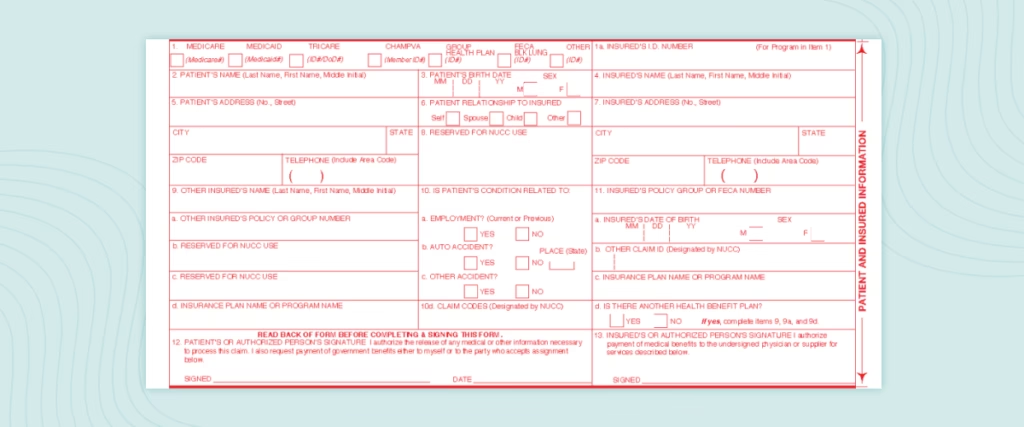
- Field 1: Insurance Type — Select only one box to indicate the primary payer (Medicare, Medicaid, TRICARE, CHAMPVA, Group Health Plan, FECA, or Other).
- Field 1a: Insured’s ID Number — Enter the policy number exactly as shown on the insurance card. For Medicare, use the Medicare Beneficiary Identifier (MBI).
- Field 2: Patient’s Name — Provide the patient’s full legal name (Last Name, First Name, Middle Initial) as it appears on the insurance record.
- Field 3: Patient’s Birth Date / Sex — Enter the birth date in MM/DD/YYYY format and indicate sex as M or F.
- Field 4: Insured’s Name — If the patient is not the policyholder, enter the insured’s full name here.
- Field 5: Patient’s Address & Phone — List the complete mailing address and phone number, including ZIP code.
- Field 6: Relationship to Insured — Indicate Self, Spouse, Child, or Other.
- Field 7: Insured’s Address — Complete only if different from the patient’s address.
- Field 9: Other Insured’s Name — Enter the name of the secondary insurance policyholder, if applicable.
- Field 9a: Other Insured’s Policy Number — Provide the secondary insurance ID number.
- Field 9b: Other Insured’s Date of Birth / Sex — Enter the insured’s birth date and sex when required.
- Field 9c: Employer’s Name or School Name — Enter employer or school information if required by the secondary payer.
- Field 9d: Insurance Plan Name or Program Name — Specify the name of the secondary insurance plan.
- Field 10a–c: Condition Related To — Indicate whether the condition is related to employment, an auto accident (include state), or another type of accident.
- Field 11: Insured’s Policy or Group Number — Enter the group or policy number exactly as shown on the insurance card.
- Field 11a: Insured’s Date of Birth / Sex — Provide the insured’s birth date and sex if different from the patient.
- Field 11b: Other Claim ID — Enter payer-specific identifiers if required.
- Field 11c: Insurance Plan Name or Program Name — List the primary insurance plan name.
- Field 11d: Is There Another Health Benefit Plan? — Indicate Yes or No to show whether additional coverage exists.
- Field 12: Patient Authorization — Indicate authorization for release of medical information. “Signature on File” may be used if properly documented.
- Field 13: Assignment of Benefits — Indicate whether the provider accepts direct payment from the insurer. “Signature on File” may be used when applicable.
Section 2: Provider and Services Information (Boxes 14–33)
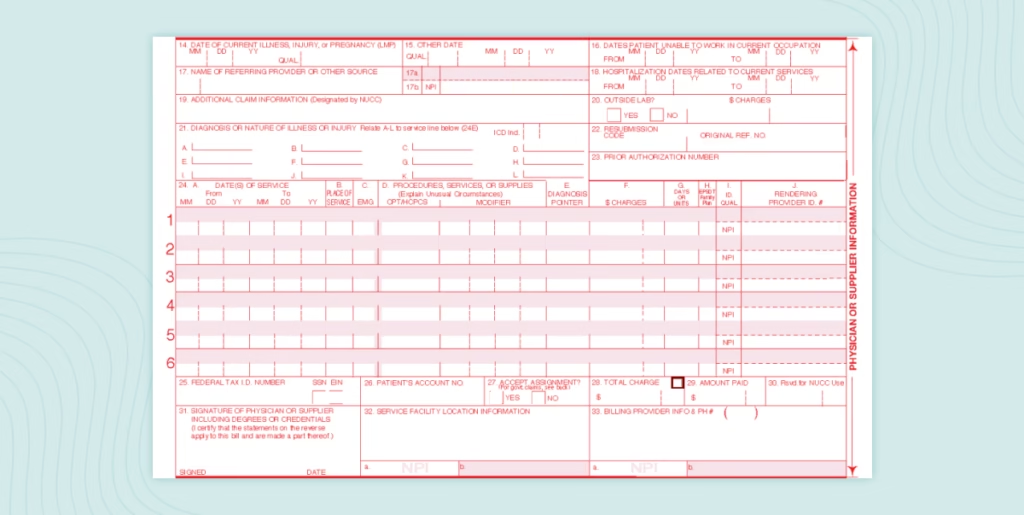
- Box 14: Date of Current Illness, Injury, or Pregnancy — Enter the first date of symptoms, injury, or last menstrual period (if applicable).
- Box 15: Other Date — Enter additional relevant dates, such as first symptom date or similar illness onset date, when required.
- Box 16: Dates Patient Unable to Work — Complete if services are related to disability or employment absence.
- Box 17: Referring Provider’s Name — Enter the full name of the referring or ordering provider when required.
- Box 17b: Referring Provider’s NPI — Enter the referring provider’s National Provider Identifier (NPI).
- Box 18: Hospitalization Dates Related to Current Services — Enter admission and discharge dates if applicable.
- Box 19: Additional Claim Information — Provide supplemental information, narrative descriptions, or documentation references when required.
- Box 20: Outside Lab? — Indicate whether laboratory services were performed by an outside lab and include charges if required.
- Box 21: ICD-10 Diagnosis Codes — Enter up to 12 ICD-10-CM diagnosis codes in priority order to establish medical necessity.
- Box 22: Resubmission Code / Original Reference Number — Complete when submitting a corrected or replacement claim.
- Box 23: Prior Authorization Number — Enter authorization or referral number when required by the payer.
- Boxes 24A–24J: Service Line Details — Complete one line per service rendered.
- Box 24A: Dates of Service — Enter “From” and “To” dates for each service.
- Box 24B: Place of Service — Enter the appropriate two-digit POS code (e.g., 11 for office, 22 for outpatient hospital).
- Box 24C: EMG — Indicate emergency services if applicable.
- Box 24D: CPT/HCPCS Code — Enter the procedure code with applicable modifiers.
- Box 24E: Diagnosis Pointer — Link each procedure to the corresponding diagnosis code(s) listed in Box 21.
- Box 24F: Charges — Enter the charge amount for each service line.
- Box 24G: Units — Indicate the number of units provided.
- Box 24H: EPSDT/Family Plan — Complete if applicable to Medicaid or family planning services.
- Box 24I: ID Qualifier — Identify the provider qualifier when required.
- Box 24J: Rendering Provider NPI — Enter the rendering provider’s NPI if different from the billing provider.
- Box 25: Federal Tax ID Number — Enter the provider’s EIN or SSN and indicate the appropriate selection.
- Box 26: Patient Account Number — Enter the internal account number for tracking purposes.
- Box 27: Accept Assignment — Indicate whether the provider accepts assignment of benefits.
- Box 28: Total Charge — Enter the total of all service line charges.
- Box 29: Amount Paid — Enter any amount already paid by the patient or other payer.
- Box 30: Reserved for NUCC Use — Leave blank.
- Box 31: Provider Signature and Date — Include the provider’s signature and date. “Signature on File” is acceptable when documented.
- Box 32: Service Facility Location Information — Enter the physical address where services were rendered if different from the billing address.
- Box 32a: Service Facility NPI — Enter the service facility’s NPI when required.
- Box 33: Billing Provider Information — Enter the billing provider’s name, address, and phone number.
- Box 33a: Billing Provider NPI — Enter the billing provider’s NPI.
- Box 33b: Billing Provider Taxonomy Code — Enter the taxonomy code if required by the payer.
Tip: Even for electronic submissions (837P), the data in these fields mirrors the same elements as the paper form.
Why the CMS 1500 Form Matters to Patients and Insurance Providers
The CMS 1500 form is not only beneficial to healthcare providers but also plays a crucial role for both patients and insurance companies. Here’s how it impacts each party:
How the CMS 1500 Form Affects Patients
- Accurate Billing: Properly completed forms help reduce billing errors and prevent surprise medical bills for patients.
- Faster Reimbursement: When claims are accurate, reimbursement processes are faster, which is especially beneficial for patients on reimbursement plans.
How the CMS 1500 Form Helps Insurance Providers
- Standardized Data: Insurance providers rely on the CMS 1500 form for consistent and standardized data, which helps minimize errors during claims processing.
- Verification: Insurance companies use the accurate information provided in the form to verify services billed and ensure compliance with policy guidelines.
Best Practices for Efficient Use of the CMS 1500 Form
To streamline the claims process and reduce errors, healthcare providers should follow these best practices when using the CMS 1500 form:
- Use Electronic Billing Tools: Leverage software and EDI systems to catch and correct errors before claims are submitted, ensuring accuracy.
- Conduct Regular Audits: Perform periodic audits to identify recurring issues, enabling proactive resolutions and improving claim accuracy.
- Provide Ongoing Training: Keep billing staff up-to-date with the latest coding changes and payer requirements to maintain compliance and reduce errors.
- Coordinate Benefits: Accurately document secondary insurance details for patients with multiple insurers to prevent billing issues and ensure complete coverage.
CMS 1500 Form vs. UB 04: Key Differences
When it comes to submitting claims for reimbursement, understanding the difference between the CMS 1500 form and the UB 04 form is essential. These two forms are both used to submit claims to insurance companies, but they serve different purposes and are used in different healthcare settings. The following table highlights the key differences between these forms:
| Aspect | CMS 1500 Form | UB-04 Form |
| Purpose | Used primarily for professional services (doctor’s office visits, outpatient services). | Used primarily for institutional services (hospital, outpatient clinics, and skilled nursing facilities). |
| Type of Provider | For individual providers such as physicians, chiropractors, and other healthcare professionals. | For facilities such as hospitals, nursing homes, and outpatient clinics. |
| Claims Submitted To | Claims are usually submitted to private insurance or Medicare Part B. | Claims are typically submitted to Medicare Part A, Medicaid, or commercial insurance for hospital-based services. |
| Content Details | Includes individual patient diagnosis codes, procedure codes, and charges for services rendered. | Includes facility-specific charges, diagnosis codes, ICD codes, and revenue codes. |
| Field Layout | Has 33 fields to fill out, including patient and provider details, date of service, diagnosis codes, and procedure codes. | Contains 81 fields to accommodate more comprehensive facility data, including patient status, type of bill, and service-specific codes. |
| Form Complexity | Generally simpler, with fewer data points. | More complex due to the additional information needed for institutional billing. |
| Primary Use | Used for outpatient claims for professional services. | Used for inpatient or outpatient facility services and institutional claims. |
| Common Providers Using the Form | Physicians, physical therapists, independent practitioners, and other non-institutional healthcare providers. | Hospitals, outpatient surgical centers, rehabilitation facilities, and long-term care facilities. |
| Type of Codes | Uses CPT (Current Procedural Terminology) codes for services and ICD-10-CM codes for diagnosis. | Uses CPT codes for outpatient services and ICD-10-CM codes for diagnoses, but also HCPCS Level II codes and Revenue codes specific to institutional billing. |
| Payment Process | Claims are paid based on the services rendered by individual healthcare professionals. | Payment is based on the type of service provided by the institution, with more complexity in billing hospital services and accommodations. |
| Required Attachments | Typically does not require attachments unless requested by the insurer. | Frequently requires additional documentation, such as hospital admission records, itemized bills, or medical records. |
Frequently Asked Questions (FAQs)
- What is the CMS 1500 form used for?
- The CMS 1500 form is used by healthcare providers to submit claims for outpatient and professional services to insurance payers.
- Who should use the CMS 1500 form?
- Non-institutional providers like physicians, therapists, and DME suppliers use the form, while hospitals use the UB 04.
- What information is needed to complete the CMS 1500 form?
- Required details include patient demographics, insurance info, diagnosis codes (ICD-10), procedure codes (CPT/HCPCS), and provider identifiers (NPIs).
- How is the CMS 1500 form submitted?
- Claims are generally submitted electronically via 837P transactions, though paper submissions are still accepted.
- Why do claims get denied?
- Claims can be denied due to incorrect coding, mismatched patient information, missing fields, or unsupported services.
- Is the CMS 1500 form still relevant today?
- Yes, it remains essential for outpatient claims and is foundational for electronic claims.
Conclusion
The CMS 1500 form is a cornerstone of medical billing. Accurately completing it ensures faster reimbursements, fewer denials, and a smoother revenue cycle for healthcare providers. Whether submitting paper forms or using electronic claims, mastering the form’s data elements is key to improving your practice’s financial health and maintaining compliance. By avoiding common errors and staying current with coding updates, you can streamline billing processes and enhance your practice’s efficiency.
Streamline Your Medical Billing and CMS 1500 Form Submission Process
Optimizing your billing process is key to timely reimbursements and minimizing denials. Now is the time to streamline your workflows, reduce errors, and improve cash flow.
For expert support with CMS 1500 form submission, medical billing, and insurance claims, Medviz Systems offers tailored services to enhance your operations and boost reimbursements.
Contact us:
Phone: +1 (727) 214-2749
Email: success@medviz.ai

Leave a Reply